Euroscope Setup
Setting up DCL/PDC
Use of DCL/PDC
All controllers must have DCL/PDC available to use when controlling Kuwait Intl. (OKKK) and Bahrain Intl. (OBBI).
Figure 1.1
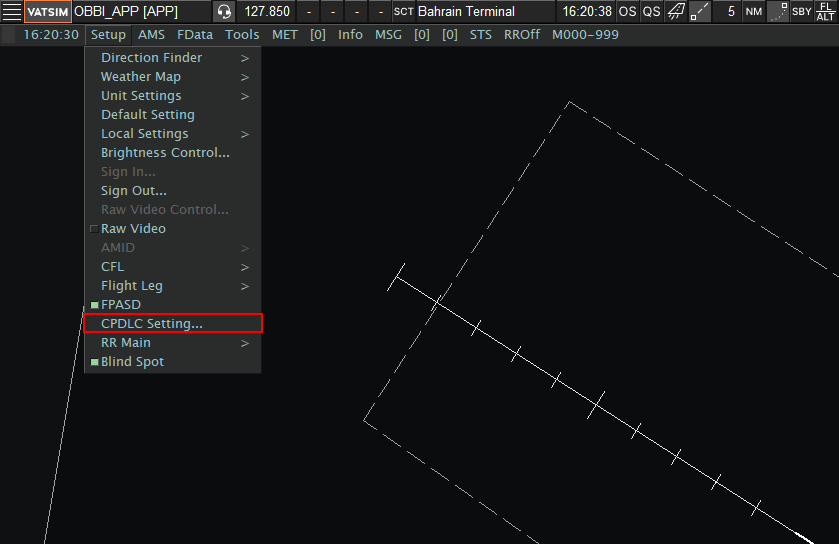
- Navigate to the Radar View and select CPDLC Settings under Setup as highlighted above.
Figure 1.2
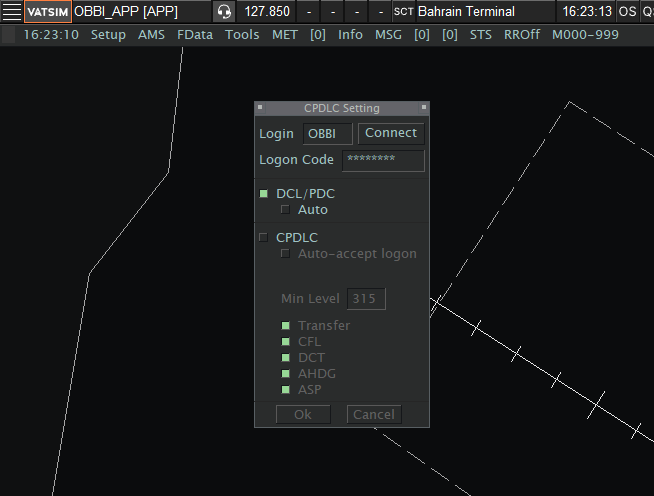
- Under Logon Code, controllers must insert their Hoppie Logon code. If you do not have an account with Hoppie ACARS, please make one here.
- All controllers APP or below must ensure that CPDLC is offline. Only PDC/DCL should be enabled.
Auto Mode
When controlling Bahrain Intl. (OBBI), Auto mode must be disabled. This is due to the fact that Bahrain has no published SIDs and a heading must be selected instead.